

Connect your sources.
Map tools and files to your projects. Bring in the initial picture, then keep it current with scheduled syncs and new file uploads.
2 projects. 30 days free. No credit card.
Automated project status reporting
Your weekly draft, prepared automatically. Evidence included. Approval stays with you.
The work keeps coming back to you.
Ordinary email attachments can be opened and forwarded beyond the intended audience.
The preparation is automated. The control is yours.
View, edit and approve by role.
Access checked for every project.
Explicit access required—even for admins.
Approved reports. AI within your access.
Confidential view. Switch away, content hides. Access is checked on resume.
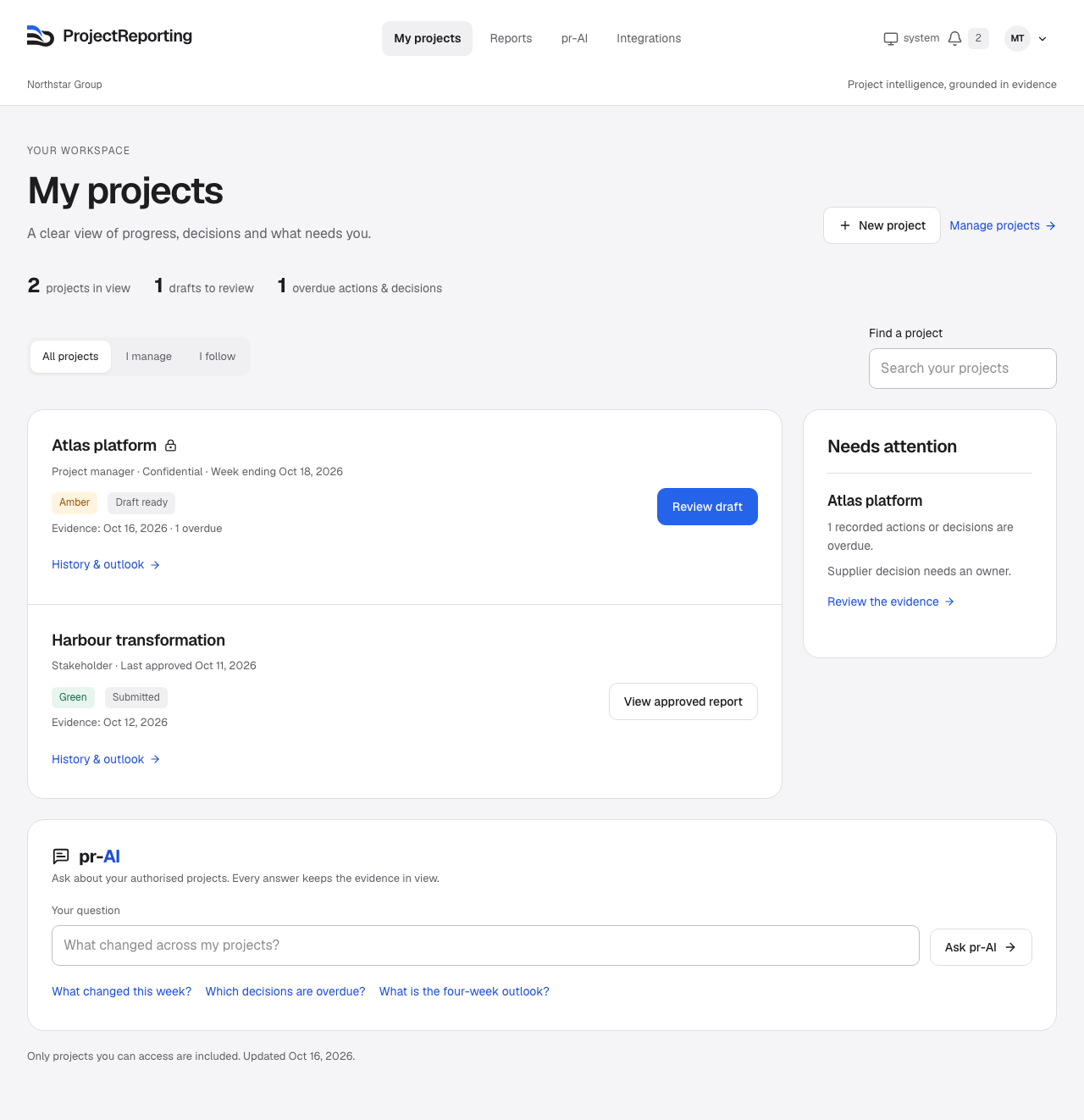


15 SOURCES. ONE REPORTING WORKFLOW.
Jira for delivery. monday.com for updates. Excel for budgets.
Bring the pieces together, without asking every team to change tools.
13 connected tools. Excel. PowerPoint. All in one place.
Connect your tools. Sync on a schedule or refresh on demand.
Bring your files. Map, preview and remember your templates. Upload again when files change.
Connections require the appropriate source account, API access and permissions. Microsoft Planner and Microsoft Project are separate connections; Project uses Dataverse.
FROM SOURCE UPDATES TO SIGN-OFF
Map tools and files to your projects. Bring in the initial picture, then keep it current with scheduled syncs and new file uploads.
Changes are compared. Open risks and commitments carry forward. Supporting evidence is linked, and information gaps stay visible.
Make your amendments and approve the report. Stakeholders read it in the product and ask pr-AI follow-up questions within their access.
More than a task summary.
RAID, decisions, milestones, budget, schedule, actions and dependencies stay part of the conversation.
A DIFFERENT WAY TO REPORT
From gathering updates to answering stakeholders, the whole reporting cycle comes together.
| The reporting burden | ProjectReporting |
|---|---|
| Disconnected tools. Endless chasing. | Your sources, brought together.Connect project tools and import Excel or PowerPoint. |
| Hours comparing, summarising and rewriting. | Your weekly draft, already prepared.Changes identified. Supporting evidence linked. |
| A snapshot that ages while it is assembled. | Freshness you can see.Source sync times and reporting cutoffs stay visible. |
| Risks and commitments lost between reports. | The whole project stays in view.Risks, issues, decisions, actions, milestones, budgets and dependencies. |
| Review comments scattered across versions. | One place to review and approve.You retain the final say. |
| Sensitive reports circulating as attachments. | Confidentiality controlled by project.Reports, history and AI answers respect project permissions. |
| Stakeholder questions creating another round of work. | Answers without another reporting exercise.pr-AI answers from approved reports within each stakeholder’s access. |
| Portfolio summaries rebuilt by hand. | The bigger picture, together.Authorised projects, historical changes and evidence-based outlooks. |
CONFIDENTIALITY, BY PROJECT
Keep sensitive project information within its assigned audience. Reports, historical records and AI answers respect the same project boundaries.
Access is personal.
MEET pr-AI
Ask what changed, what is still unresolved and what past evidence suggests about the outlook. Across one project or your authorised portfolio.
See the workspace“Which projects need my attention—and why?”
History for context. Recorded trends for outlooks.
Missing evidence made clear.
START SMALL. SEE THE DIFFERENCE.
Experience the reporting workflow before you expand.
30 days from your first project. Two free project places per organisation. Archiving does not reset the allowance.
Upgrade after 30 days, or for a third project, fourth editor or more than 20 viewers. All editing seats are charged.
Deployment, security and support requirements agreed before rollout.
Dedicated deployment, regional hosting or a tailored rollout. Discuss your requirements with the Neeyv team.
A LITTLE MORE CLARITY
ProjectReporting brings project information into a consistent weekly reporting workflow. It compares the latest imported records with earlier project state, carries unresolved management items forward and prepares an evidence-linked draft. Your project manager reviews and approves the report before stakeholders see it.
Yes. Map connected tools and uploaded files to the same project. ProjectReporting supports 13 connected sources plus Excel and PowerPoint imports. Map XLSX worksheet cells and tables, or native PPTX tables and text sections, to your reporting fields. Preview the extracted evidence and confirm the mapping; saved templates are checked for layout changes on later uploads. Scanned pages and image-only content are not read, and legacy XLS/PPT files need conversion first.
Your teams can continue working in their existing tools. ProjectReporting adds the reporting workflow: source imports, change comparison, draft preparation, PM review, stakeholder access and portfolio visibility.
Drafts use the latest successfully imported records available at the reporting cutoff. Connected sources support scheduled weekly refreshes and manual synchronisation. Excel and PowerPoint need a new upload when the files change. Approved reports remain a record of what was approved; they do not silently change as source data changes.
Confidential projects require explicit project assignments, including for administrators. Access is checked for reports, history and AI answers. Stakeholders work with approved reports within their permissions. Standard stakeholder magic links are not used for confidential projects. Browser privacy controls do not prevent operating-system screenshots.
Yes. Users can ask about the projects and reporting periods they are authorised to access. Answers link to supporting evidence. Where sufficient historical observations exist, outlooks describe observed trends and stated assumptions. They are not guaranteed predictions, and missing evidence is made explicit.
You can use two projects with one administrator and two additional editors, plus up to 20 viewers and stakeholders combined. The 30 days start when your first project is created. No credit card is required. After 30 days, editing, imports and automation pause until you subscribe; existing reports remain readable. The two free project places are a lifetime allowance for your organisation; archiving a project does not reset that allowance.
The paid plan costs USD $29.99 per editing seat per month. All editing seats are charged; viewer-only members and stakeholders are free and unlimited on the paid plan. After 30 days, or for a third project, fourth editor or more than 20 viewers, upgrade to cover all editing seats.
YOUR NEXT REPORT STARTS HERE
30 days free. 2 projects. 3 editors. 20 viewers. No credit card required.